How to Host a Website: The Complete Beginner's Guide to Domains, Hosting, DNS, SSL and Website Launch
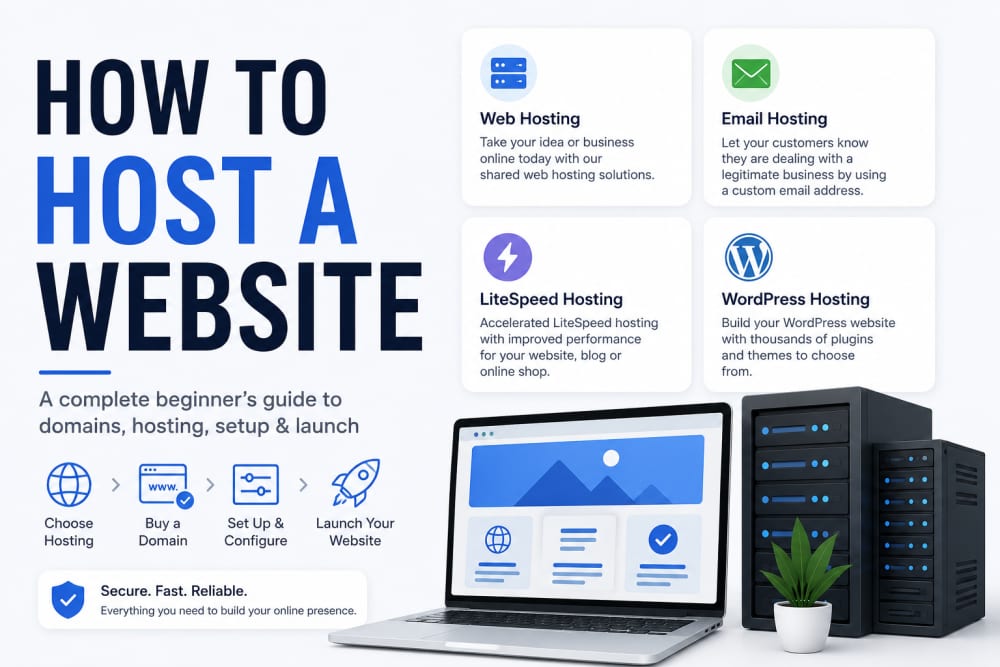
Hosting a website simply means placing your website files on an internet-connected server so people can visit it using a domain name such as yourbusiness.co.ke, yourname.com, or schoolproject.org.
That sounds simple, but beginners often get confused by the many pieces involved: domain names, hosting plans, DNS records, SSL certificates, cPanel, WordPress, email accounts, databases, backups, and search engine indexing.
I understand that confusion very well. When I first started working with websites, I thought uploading files was the whole process. Later, I realized that a good website setup is not only about getting a homepage online. It is about performance, security, trust, backups, SEO, and choosing a hosting setup that matches the purpose of the site.
This guide explains the full process in plain language. Whether you are a student building your first portfolio, a small business owner in Kenya, an ICT learner, a blogger, or someone trying to publish a project online, this article will walk you through the exact concepts you need to understand before hosting a website.
Quick Navigation
- What Is Web Hosting?
- Domain Name vs Web Hosting
- Types of Web Hosting
- How to Choose the Right Hosting Plan
- Choosing a Hosting Provider
- Step-by-Step: How to Host a Website
- Understanding DNS Records
- Uploading Website Files
- SSL, HTTPS, and Website Security
- WordPress vs Custom Code
- Common Hosting Mistakes to Avoid
- How Hosting Affects SEO
- What to Do After Hosting Your Website
- Frequently Asked Questions
- References
What Is Web Hosting?
Web hosting is a service that stores your website files on a server and makes them accessible through the internet.
A website is usually made up of files such as:
- HTML files
- CSS files
- JavaScript files
- Images
- Videos
- Databases
- Application files
When someone types your domain name into a browser, the browser contacts the hosting server and requests the website files. The server responds by sending those files back to the visitor’s browser, where they are displayed as a webpage.
Think of hosting like renting space for your shop. Your domain name is the address people use to find the shop. Your hosting account is the actual building where your content lives.
If your hosting is slow, unreliable, or poorly secured, your website experience suffers. Visitors may leave quickly, Google may struggle to crawl pages properly, and business trust may be reduced.
That is why choosing the right hosting setup matters from the beginning.
Domain Name vs Web Hosting
Many beginners confuse domain names and hosting. They work together, but they are not the same.
What Is a Domain Name?
A domain name is the address of your website.
Examples include:
- techknowsolution.co.ke
- google.com
- example.org
Without a domain name, visitors would need to access your website using a server IP address, which is not practical for normal users.
What Is Hosting?
Hosting is where the actual website files are stored.
You can buy a domain from one company and host the website with another company, or you can buy both from the same provider. Many beginners prefer buying both in one place because it simplifies setup, billing, and support.
For Kenyan businesses, a .co.ke domain can also help signal local relevance. It is often a good option for local businesses, personal brands, institutions, and service providers targeting Kenyan users.
Types of Web Hosting
Not every hosting plan is the same. The best option depends on your budget, technical ability, website size, and expected traffic.
1. Shared Hosting
Shared hosting means your website shares server resources with other websites.
This is usually the most affordable option and is suitable for:
- Personal blogs
- Portfolio websites
- Small business websites
- Student projects
- Simple WordPress websites
For most beginners, shared hosting is enough. It is affordable, easy to manage, and usually comes with cPanel or a similar control panel.
2. VPS Hosting
VPS stands for Virtual Private Server.
With VPS hosting, you get more control and dedicated resources compared to shared hosting. It is suitable for websites or applications that need more performance, custom configuration, or better isolation.
However, VPS hosting requires more technical knowledge. You may need to understand server administration, Linux commands, security hardening, and application deployment.
3. Cloud Hosting
Cloud hosting uses multiple servers to deliver better scalability and reliability. Instead of depending on one physical server, cloud infrastructure can distribute resources across a wider environment.
This is useful for growing businesses, applications with variable traffic, and services that need high availability.
4. Dedicated Hosting
Dedicated hosting gives you an entire server for your website or application.
It is powerful but expensive. Most beginners do not need dedicated hosting. It is usually used by large companies, high-traffic platforms, or organizations with strict performance and security requirements.
5. Managed WordPress Hosting
Managed WordPress hosting is optimized for WordPress websites.
The provider may handle updates, caching, security, backups, and performance optimization. This can be useful for bloggers, businesses, and non-technical users who want fewer technical responsibilities.
How to Choose the Right Hosting Plan
Before buying hosting, ask yourself what kind of website you are building.
A personal portfolio does not need the same resources as an e-commerce website. A school project does not need the same setup as a news website receiving thousands of visitors daily.
Consider These Factors
1. Website Purpose
If you are creating a simple website with a few pages, shared hosting is usually enough.
If you are running a large application, online store, or high-traffic platform, you may need VPS or cloud hosting.
2. Storage
Storage matters if your site uses many images, videos, PDFs, or downloadable files.
For blogs, image optimization is important. Large uncompressed images can quickly consume storage and slow down the site.
3. Bandwidth
Bandwidth refers to the amount of data transferred between your website and visitors.
A site with many visitors, large images, or downloads needs more bandwidth than a small static site.
4. Uptime
Uptime measures how often your website is available online.
Reliable hosting should keep your site accessible most of the time. Frequent downtime can affect user trust, business reputation, and SEO performance.
5. Support
Good support is extremely important for beginners.
When your website goes down or DNS fails, you need a hosting provider that can respond clearly and quickly.
6. Security Features
Look for features such as:
- SSL certificates
- Backups
- Malware scanning
- Firewall protection
- Email security
Security should never be treated as an afterthought.
Choosing a Hosting Provider

For beginners in Kenya, I recommend choosing a provider that offers clear pricing, local relevance, support, SSL options, cPanel access, and easy domain management.
One option you can consider is HostAfrica Web Hosting. It is useful for users who want web hosting that is accessible to Kenyan website owners, bloggers, small businesses, and learners building practical projects.
Do not choose a hosting provider only because it is cheap. Cheap hosting can become expensive if it causes downtime, poor support, slow loading, or limited features.
When comparing providers, check:
- Available hosting plans
- cPanel or control panel access
- SSL support
- Domain options
- Email account features
- Backup policy
- Customer support channels
- Renewal prices
A good hosting provider should make your website easier to manage, not harder.
Step-by-Step: How to Host a Website
Here is the practical process of hosting a website from start to finish.
Step 1: Choose Your Website Type
First, decide what you are building.
Examples:
- Personal portfolio
- Business website
- Blog
- School project
- Online store
- Web application
Your website type affects the hosting plan, platform, and technical setup.
Step 2: Register a Domain Name
Choose a domain name that is simple, memorable, and related to your brand.
Good domain names are:
- Short
- Easy to spell
- Relevant
- Professional
- Not confusingly similar to another brand
If you are targeting Kenya, a .co.ke domain may be a strong local option.
Step 3: Buy a Hosting Plan
Choose a hosting plan based on your needs.
For most beginners, shared hosting is a practical starting point.
You can compare plans on HostAfrica Web Hosting and select one that matches your website goals.
Step 4: Connect Domain to Hosting
If your domain and hosting are from the same provider, this may happen automatically.
If they are from different providers, you may need to update nameservers or DNS records.
Step 5: Upload Website Files or Install WordPress
If you are using WordPress, your hosting panel may provide an installer.
If you have custom HTML, CSS, and JavaScript files, upload them to the correct web directory, often called public_html in cPanel environments.
Step 6: Enable SSL
SSL makes your website load using HTTPS.
This protects data in transit and increases visitor trust.
Step 7: Test the Website
Open the website on:
- Desktop
- Mobile
- Different browsers
- Different internet connections
Check whether pages load correctly, images appear, buttons work, and forms submit properly.
Step 8: Submit to Search Engines
After publishing, connect your site to Google Search Console and submit your sitemap.
This helps Google discover your pages more efficiently.
Understanding DNS Records

DNS stands for Domain Name System.
DNS connects your domain name to the correct server.
Cloudflare explains that DNS records contain information about a domain and help make websites and other services available to visitors. Common DNS records include A records, AAAA records, CNAME records, and MX records. Cloudflare’s DNS learning center provides a clear, beginner-friendly explanation.
Common DNS Records
A Record
An A record points a domain to an IPv4 address.
AAAA Record
An AAAA record points a domain to an IPv6 address.
CNAME Record
A CNAME points one domain or subdomain to another domain.
MX Record
An MX record controls email routing.
DNS changes may take time to update across the internet. This delay is known as propagation.
Uploading Website Files
If your website is built using HTML, CSS, and JavaScript, you will need to upload files to your hosting account.
Many shared hosting providers use cPanel. The cPanel File Manager allows users to upload, download, rename, edit, compress, extract, and manage files in the hosting account. According to the official cPanel File Manager documentation, File Manager organizes files into folders and allows users to upload individual items such as files and images.
Typical Upload Process
- Log in to cPanel.
- Open File Manager.
- Go to public_html.
- Upload your website files.
- Ensure your homepage is named index.html, index.php, or another supported default file.
- Visit your domain in a browser to test the site.
If your homepage is not named correctly, the server may not know which file to show first.
SSL, HTTPS, and Website Security
SSL is one of the first security features every website owner should enable.
When SSL is active, your website uses HTTPS instead of HTTP.
HTTPS helps protect data exchanged between the visitor’s browser and your website. This is especially important for login pages, contact forms, payment pages, and user accounts.
The cPanel SSL/TLS interface can be used to set up SSL/TLS for domains in a cPanel account, according to the cPanel SSL guide.
Basic Website Security Checklist
- Enable HTTPS.
- Use strong hosting passwords.
- Keep WordPress, themes, and plugins updated.
- Remove unused plugins and themes.
- Use backups.
- Protect admin accounts with strong passwords.
- Avoid uploading unknown scripts.
A website does not become secure simply because it is online. It becomes secure through proper maintenance.
WordPress vs Custom Code
Many beginners ask whether they should use WordPress or custom code.
The answer depends on your goals.
Use WordPress If:
- You want to publish articles easily.
- You need a blog.
- You prefer ready-made themes.
- You do not want to code everything manually.
- You need plugins for forms, SEO, galleries, or shops.
Use Custom Code If:
- You are learning web development.
- You want full control.
- You are building a custom application.
- You need special features.
- You want to improve programming skills.
For ICT students, custom code is excellent for learning. For business owners who need a site quickly, WordPress may be more practical.
In my experience, the best approach depends on the user. A student building a portfolio should understand HTML, CSS, and hosting basics. A small business owner may need a stable WordPress website that is easy to update without touching code.
Common Hosting Mistakes to Avoid
1. Choosing Hosting Only Because It Is Cheap
Low price is attractive, but poor hosting can cause downtime and slow performance.
2. Ignoring Backups
Many website owners only think about backups after something goes wrong.
Backups should be part of your setup from day one.
3. Forgetting SSL
A website without HTTPS may appear less trustworthy to visitors.
4. Uploading Files to the Wrong Folder
For cPanel hosting, public website files usually belong inside public_html.
5. Using Weak Passwords
Your hosting account controls your website. Protect it properly.
6. Not Updating WordPress
Outdated WordPress installations, themes, and plugins can create security risks.
7. Not Testing on Mobile
Many visitors browse using phones. A website that looks good only on desktop is incomplete.
How Hosting Affects SEO
Hosting does not automatically make your website rank number one.
However, hosting can indirectly affect SEO through performance, uptime, security, and user experience.
Speed
Slow websites frustrate users. If pages take too long to load, visitors may leave before reading your content.
Uptime
If search engines and users repeatedly find your website offline, trust can suffer.
HTTPS
HTTPS improves trust and is widely expected on modern websites.
Server Location and Audience
If most of your audience is in Kenya or Africa, choosing a provider with strong regional support may improve the practical user experience.
Clean Website Structure
Hosting your website is only the start. Good SEO also requires:
- Useful content
- Clear headings
- Fast images
- Internal links
- Mobile-friendly design
- Sitemap submission
- Consistent updates
A reliable hosting environment supports SEO, but content quality still matters most.
What to Do After Hosting Your Website
Once your website is live, your work is not finished.
A website is like a digital office. It needs cleaning, maintenance, monitoring, and improvement.
Post-Launch Checklist
- Test all pages.
- Enable HTTPS.
- Set up backups.
- Create a sitemap.
- Submit to Google Search Console.
- Install analytics.
- Compress large images.
- Check mobile responsiveness.
- Update content regularly.
- Review security settings.
For TechKnow Solutions readers, this is also where practical ICT learning begins. Hosting a website teaches DNS, file management, SSL, databases, troubleshooting, security, and performance optimization.
That is why I recommend every ICT student to host at least one real project. Theory becomes clearer when you experience real errors, DNS delays, broken images, missing files, SSL warnings, and deployment issues.
Frequently Asked Questions
What is the easiest way to host a website?
For most beginners, the easiest way is to buy shared hosting, register a domain, install WordPress or upload files through cPanel, enable SSL, and test the website.
Do I need coding skills to host a website?
No. You can host a website using WordPress without writing code. However, learning basic HTML, CSS, and DNS concepts helps you understand what is happening behind the scenes.
What is cPanel?
cPanel is a web-based control panel used to manage hosting tasks such as files, domains, emails, databases, and SSL settings. HostAfrica also describes cPanel as a control panel for managing website hosting features such as email, FTP, and databases in its beginner cPanel guide.
Can I host a website for free?
Yes, some platforms offer free hosting, but free plans often include limitations such as ads, weak performance, limited support, restricted domains, or poor scalability. For a serious website, paid hosting is usually better.
Is HostAfrica good for beginners?
HostAfrica can be a practical option for beginners who want accessible web hosting, domain services, and hosting tools. You can explore its plans here: HostAfrica Web Hosting.
What is the difference between hosting and a website builder?
Hosting provides the server space where your website files live. A website builder helps you design pages visually. Some providers combine both.
How long does it take for a website to go live?
If the domain and hosting are configured correctly, a website can go live within minutes. DNS changes may sometimes take longer to fully propagate.
My Final Thoughts
Hosting a website is one of the most important practical skills in modern ICT.
It teaches you how the internet works beyond theory. You learn how domains point to servers, how DNS records control traffic, how SSL protects visitors, how files are uploaded, how content is published, and how website performance affects user experience.
For business owners, hosting a website creates online visibility.
For students, it builds real technical confidence.
For professionals, it strengthens personal branding.
For bloggers and creators, it creates a platform that you control.
My advice is simple: do not wait until everything is perfect. Start with a simple website, host it properly, learn from the process, and improve it over time.
If you are ready to begin, you can explore HostAfrica Web Hosting and compare a hosting plan that matches your website goals.
The first website you host may not be perfect, but it will teach you lessons that no tutorial can fully replace.
References
- Google Search Central: Qualify Outbound Links
- cPanel Documentation: File Manager
- cPanel Documentation: Guide to SSL
- Cloudflare Documentation: Manage DNS Records
- Cloudflare Learning Center: DNS Records
- HostAfrica: Super Simple Guide to cPanel
- HostAfrica Web Hosting
About the author
Caleb Muga is the founder of SurgeTechKnow, an ICT professional and software developer with BBIT, CCNA training, cybersecurity awareness and OPSWAT file-security training. Articles are written to simplify practical technology, cybersecurity, networking and ICT support topics for real users.
Read the full SurgeTechKnow profile →