Why Your Internet Is Slow Even When You Paid for Fast Internet

Why Your Internet Is Slow Even When You Paid for Fast Internet
You pay for a 50 Mbps, 100 Mbps, or even 200 Mbps internet package, yet your videos still buffer, meetings freeze, and websites sometimes crawl.
The frustration is understandable. You paid for speed, so you expect everything connected to the internet to feel fast all the time.
But internet performance is not controlled by one number on your package. It depends on the entire journey between your device and the service you are trying to reach.
Over the years, I have seen users blame their Internet Service Provider immediately, only to discover that the real problem was a badly positioned router, a crowded Wi-Fi channel, an old laptop, a background cloud backup, or too many devices sharing one connection.
Sometimes the ISP really is at fault. However, before upgrading your package or changing providers, it helps to separate an internet-speed problem from a Wi-Fi, device, application, or network-design problem.
Quick Navigation
Jump directly to the issue you suspect.
What Your Internet Package Really Means
When an ISP advertises 100 Mbps, that figure normally refers to the maximum download rate available under certain conditions. It does not mean every individual device will always receive 100 Mbps.
That bandwidth may be shared across your entire household or office. It can also be affected by whether the connection is wired or wireless, how far you are from the router, the quality of your equipment, network congestion, and the speed of the server you are contacting.
Important: Mbps means megabits per second, not megabytes per second. An advertised 80 Mbps connection has a theoretical maximum download rate of about 10 megabytes per second before overhead and real-world losses.
Think of the package as the width of a road. A wider road can carry more traffic, but individual cars may still slow down because of junctions, road conditions, congestion, or mechanical limitations.
Your Wi-Fi Is Often the Real Problem
A speed test performed next to the router may look excellent, while the same test in a bedroom, kitchen, upstairs office, or outside room produces poor results.
That usually means the broadband connection entering your home is fine, but the wireless signal between the router and your device is weak or unstable.
Wi-Fi signals lose strength when they pass through walls, floors, furniture, metal doors, mirrors, concrete, water tanks and electrical appliances. Thick stone or reinforced concrete walls can be especially difficult.
- A strong signal does not always mean low interference.
- A device may remain connected while experiencing packet loss.
- Automatic roaming between access points may not always happen smoothly.
- A phone may switch between 2.4 GHz and 5 GHz at inconvenient moments.
Better Router Placement Can Transform Performance
A router hidden behind a television, placed on the floor, locked inside a cabinet, or pushed into one corner of the building will struggle to distribute a good signal evenly.
For better coverage, place it:
- Near the centre of the area you want to cover
- Above floor level
- In an open location
- Away from large metal objects and appliances
- Away from thick walls where possible
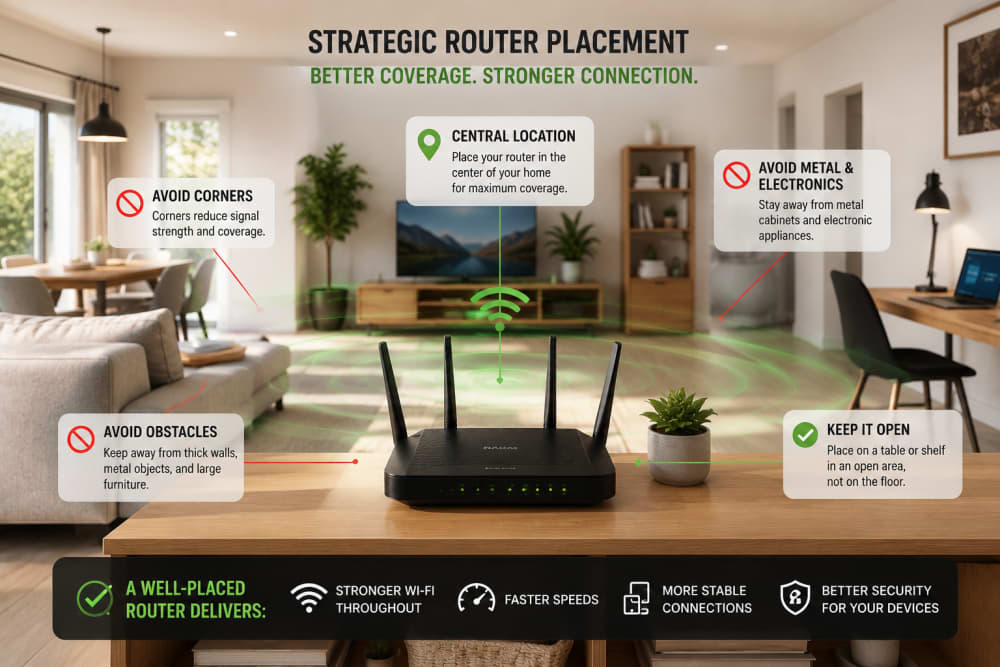
Optimising router placement for better coverage
In a large or multi-storey building, one router may simply be insufficient. A properly designed mesh system or wired access points usually performs better than relying on a cheap repeater placed where the original signal is already weak.
Too Many Devices Are Sharing the Same Connection
Modern homes and offices often have far more connected devices than users realise. Phones, televisions, laptops, tablets, security cameras, smart speakers, printers and game consoles may all remain connected at the same time.
The problem is not simply the number of devices. It is what those devices are doing.
- One television may be streaming in 4K.
- Several phones may be backing up photos.
- A laptop may be downloading a large system update.
- Security cameras may be continuously uploading video.
- A gaming console may be downloading a multi-gigabyte game.
A good router can manage many connected devices, but it cannot create unlimited bandwidth. Quality of Service settings can help prioritise calls, gaming, business systems or other important traffic.
You May Also Like to Read About
Your Router May Be Too Old or Underpowered
Upgrading from a slow package to fibre does not automatically upgrade the router. An older router may have limited processing power, outdated Wi-Fi standards, slow Ethernet ports, poor antennas, weak security support or insufficient memory.
A router can become the bottleneck when it cannot process traffic as quickly as the connection delivers it. This is especially noticeable when many users are active, VPNs are running, or the router is handling advanced features such as filtering and parental controls.
Check whether your router supports gigabit Ethernet if your package exceeds 100 Mbps. Also confirm that your Ethernet cables are capable of the expected speed and are not damaged.
Wi-Fi Interference Is More Common Than You Think
In apartments, hostels, estates and office blocks, many wireless networks compete for the same radio space. A device can show a strong signal and still perform poorly because the channel is congested.
2.4 GHz
The 2.4 GHz band travels farther and passes through walls better, but it is usually more crowded and has fewer non-overlapping channels.
5 GHz
The 5 GHz band is often faster and less congested, but it has a shorter range and weakens more quickly through obstacles.
6 GHz
Newer Wi-Fi systems may also support 6 GHz. It offers more clean spectrum but requires compatible devices and generally has a shorter effective range.
Bluetooth equipment, wireless cameras, microwaves and poorly shielded electronics may also contribute to interference. Automatic channel selection can help, but in crowded environments, a manual survey may be necessary.
Not Every Device Can Use the Full Speed
Two devices connected to the same router may produce completely different results. A newer phone may support modern Wi-Fi standards and multiple antennas, while an older laptop may have a basic wireless card with lower maximum speeds.
Performance may also be reduced by:
- Outdated network drivers
- Power-saving settings
- Damaged antennas
- Low memory or heavy CPU usage
- A slow storage drive
- Old browser versions
The connection may be fast, but the device may struggle to process the page, decode video or run several applications at once.
Background Applications May Be Consuming the Bandwidth
Windows Update, OneDrive, Google Drive, phone backups, antivirus updates, app-store downloads and cloud synchronisation can all consume bandwidth without drawing much attention.
Upload-heavy traffic is especially disruptive on connections with limited upload capacity. When the upload path becomes saturated, even simple browsing can feel slow because acknowledgements and requests are delayed.
This is why a home may experience poor video calls while someone else is uploading large files, backing up photos or streaming live video from security cameras.
Browser Extensions and Heavy Web Pages
Sometimes the browser is the problem rather than the network. Poorly designed extensions can inject advertisements, inspect page content, consume memory and delay loading.
Try a private browsing window, disable extensions temporarily, clear corrupted cache files, or test the same site in another browser.
Download Speed Is Not the Whole Story
A connection can show excellent download speed and still feel poor because user experience also depends on latency, jitter, packet loss and upload performance.
- Latency: How long data takes to travel to its destination and back.
- Jitter: How much the delay changes from one packet to another.
- Packet loss: Data that fails to arrive and must be retransmitted.
- Upload speed: How quickly your device can send data to the internet.
Video calls and online gaming need stable low latency more than extremely high download speeds. Cloud backups, livestreaming and sending large attachments depend heavily on upload speed.
A fast speed test does not automatically prove that the connection is healthy. Run several tests at different times and compare Wi-Fi with Ethernet.
DNS Problems Can Make Websites Feel Slow
DNS translates names such as google.com into IP addresses. If the DNS server is slow, unavailable or misconfigured, a website may take a long time to begin loading even when the connection itself has plenty of bandwidth.
google.com
↓
IP address
Changing DNS may help in some cases, but it should not be treated as a magical speed booster. It mainly affects name resolution, not the maximum download rate of your connection.
When the ISP Is Actually the Problem
There are situations where the service provider is genuinely responsible. These may include local outages, poor signal levels, damaged fibre or copper lines, overloaded infrastructure, incorrect account provisioning, routing problems, or peak-hour congestion.
The following signs make an ISP-side issue more likely:
- Ethernet and Wi-Fi are both slow.
- Several devices experience the same problem.
- Performance drops at the same time every day.
- The router shows a loss of signal or frequent reconnection.
- The speed is far below the package even beside the router or on Ethernet.
- Neighbours using the same provider report the same fault.
Record test results, dates, times and whether the test used Ethernet or Wi-Fi. This gives the provider useful evidence instead of a vague statement that the internet is “sometimes slow.”
A Practical Step-by-Step Troubleshooting Process
- Test one device close to the router. Disconnect from VPNs and pause large downloads.
- Run more than one speed test. Test at different times and use a nearby server where possible.
- Restart the router, modem or fibre terminal. Power them off briefly, then start them in the correct order.
- Compare Wi-Fi with Ethernet. A good wired result and a poor Wi-Fi result point toward a wireless problem.
- Test another device. If only one device is slow, inspect that device rather than the whole network.
- Check connected devices. Look for unknown users, cameras, backups, updates or large downloads.
- Inspect router placement and signal strength. Move closer and compare results.
- Try another Wi-Fi band. Compare 2.4 GHz with 5 GHz where supported.
- Update firmware and network drivers. Use official manufacturer sources.
- Scan for malware and unwanted extensions. Sudden, unexplained traffic deserves investigation.
- Check cables and ports. A damaged cable or a 100 Mbps port can restrict a faster connection.
- Contact the ISP with evidence. Provide wired tests, times, screenshots and router status information.
Frequently Asked Questions
Does restarting the router really help?
Yes. Restarting can clear temporary errors, refresh connections and stop stuck processes. However, a router that needs frequent restarting may be overheating, overloaded, outdated or faulty.
Why is my speed test fast, but YouTube still buffers?
The problem may involve packet loss, unstable Wi-Fi, congestion, the content provider, a browser problem, or another device consuming bandwidth. One speed test cannot measure every part of the experience.
Is Ethernet always better than Wi-Fi?
Ethernet is usually more stable, predictable and resistant to interference. Wi-Fi offers mobility and convenience, but its performance changes with distance, obstacles and radio congestion.
Should I upgrade my package?
Upgrade only after confirming that your current bandwidth is genuinely insufficient. If the real problem is weak coverage, an old router or interference, paying for a faster package may change very little.
Can someone else be using my Wi-Fi?
Yes. Check the router's connected-device list, change the Wi-Fi password, use WPA2 or WPA3 security, disable outdated WPS where appropriate, and remove unfamiliar devices.
Why is the internet slower in the evening?
Evening slowdowns may be caused by more household activity, crowded local Wi-Fi channels or peak-hour congestion within the provider's network.
My Final Thoughts
Internet quality is the combined result of the ISP connection, router, Wi-Fi environment, cables, devices, applications and remote services.
That is why a household can pay for a high-speed package and still experience poor performance. The package may be fast, while one part of the local network quietly limits everything else.
Before paying for a more expensive plan, test systematically. Compare Ethernet and Wi-Fi, test more than one device, inspect background traffic, improve router placement and record results at different times.
The fastest solution is not always buying more speed. Sometimes it is removing the bottleneck that prevents you from using the speed you already have.
References and Further Reading
About the author
Caleb Muga is the founder of SurgeTechKnow, an ICT professional and software developer with BBIT, CCNA training, cybersecurity awareness and OPSWAT file-security training. Articles are written to simplify practical technology, cybersecurity, networking and ICT support topics for real users.
Read the full SurgeTechKnow profile →Related Networking Articles

How Computers Communicate on the Internet: A Complete Beginner’s Guide to Packets, IP Addresses, Routers, DNS, TCP and the Journey of Your Data

Networking Tools Every ICT Student Should Know: A Practical Beginner’s Guide