Networking Tools Every ICT Student Should Know: A Practical Beginner’s Guide

You can be in a networking class for months and still feel lost the first time a real network refuses to behave.
The internet is “on,” the router lights are blinking, the lecturer says the configuration is correct, but one device still cannot reach another. Everyone starts guessing. Someone blames the cable. Another person blames the IP address. Another says the switch is faulty.
That is the moment an ICT student begins to understand a simple truth: networking is not mastered by theory alone.
You need tools. Not expensive tools at first, but the right tools. The kind that helps you see what is happening, test what is working, prove what is broken, and explain your findings confidently.
I learned this lesson while practicing networking labs and troubleshooting small real-world setups. At first, I thought memorizing commands and definitions was enough. But when a device failed to communicate, the real learning started only after I opened the right tool, checked the IP address, tested reachability, inspected the packet flow, and documented what I found.
This guide is for ICT students, CCNA beginners, computer science learners, junior technicians, and anyone who wants to move from “I know networking terms” to “I can troubleshoot a network with confidence.”
Quick Navigation
Jump straight to the networking tool you want to understand.
- ➜ Why Networking Tools Matter More Than Guesswork
- ➜ Cisco Packet Tracer: Your First Safe Lab
- ➜ Ping and Traceroute: The First Troubleshooting Tests
- ➜ IP Configuration Tools: Know Your Device First
- ➜ Wireshark: Seeing Packets With Your Own Eyes
- ➜ PuTTY and SSH Clients: Talking to Network Devices
- ➜ Nmap: Network Discovery With Permission
- ➜ Subnet Calculators: Stop Fearing IP Addressing
- ➜ Documentation Tools: Think Like a Professional
- ➜ A Simple Learning Path for ICT Students
- ➜ Final Thoughts
Why Networking Tools Matter More Than Guesswork
A weak technician guesses. A growing professional tests.
That difference may sound small, but in networking, it matters a lot. Networks fail for many reasons: incorrect IP settings, faulty cables, DNS issues, blocked ports, VLAN misconfiguration, weak Wi-Fi signal, routing errors, firewall rules, or even a simple unplugged patch cable.
Without tools, all those problems can look the same: “the internet is not working.”
With tools, you can separate the problem into layers. Is the device connected? Does it have an IP address? Can it reach the gateway? Can it resolve domain names? Can it reach the destination server? Where exactly does communication stop?
That is how real troubleshooting begins.
1. Cisco Packet Tracer: Your First Safe Lab
Cisco Packet Tracer is one of the best starting points for ICT students because it lets you build networks without buying routers, switches, access points, or servers.
You can drag devices into a virtual workspace, connect them, assign IP addresses, configure VLANs, test routing, simulate DHCP, and observe how packets move through the network. For a student, this is powerful because mistakes become part of learning rather than expensive accidents.
When I started practicing labs, Packet Tracer helped me understand concepts that looked confusing on paper. VLANs, default gateways, trunk links, router-on-a-stick, static routes, and DHCP became easier once I could see devices communicating visually.
Use Packet Tracer to practice:
- Basic LAN design
- IP addressing and subnetting
- Switch and router configuration
- VLANs and trunking
- DHCP, DNS, and simple server services
- Troubleshooting broken topologies
The goal is not just to complete labs. The goal is to break things, fix them, and understand why the fix worked.
2. Ping and Traceroute: The First Troubleshooting Tests

If there are two tools every ICT student should know early, they are ping and traceroute.
Ping helps you test whether one device can reach another. It is simple, but very useful. If your laptop cannot ping the default gateway, you probably have a local connection, IP addressing, Wi-Fi, switch, or VLAN problem.
Traceroute goes a step further. It shows the path traffic takes toward a destination. This helps you see where traffic may be slowing down or stopping.
In Windows, many students use tracert. In Linux and macOS, the common command is traceroute. The names differ slightly, but the purpose is similar.
A good beginner troubleshooting habit is this:
- Ping your own IP address or loopback address.
- Ping the default gateway.
- Ping another device in the same network.
- Ping an external IP address.
- Test a domain name to check DNS.
This simple order can save you from random guessing.
3. IP Configuration Tools: Know Your Device First
Before blaming the router, ISP, switch, or server, check your own device.
On Windows, ipconfig helps you view your IP address, subnet mask, default gateway, DNS servers, and adapter details. On Linux and macOS, students commonly use tools such as ip, ifconfig, and network settings depending on the system.
This matters because many beginner network problems start with the wrong address. Maybe the device received an automatic private address. Maybe the gateway is missing. Maybe DNS points to the wrong server. Maybe Wi-Fi is connected, but the device is on the wrong network.
Train yourself to check these items first:
- IP address
- Subnet mask or prefix length
- Default gateway
- DNS server
- Connection type: Ethernet, Wi-Fi, or virtual adapter
Once you understand your own device, the rest of the troubleshooting becomes more organized.
4. Wireshark: Seeing Packets With Your Own Eyes

Wireshark is where networking stops being invisible.
Many students hear words like TCP handshake, DNS query, ARP request, HTTP traffic, TLS, DHCP discover, and ICMP echo request, but they remain abstract until Wireshark shows them on the screen.
Wireshark is a network protocol analyzer. It can capture traffic and allow you to inspect packet details. That makes it useful for learning, troubleshooting, and understanding how devices communicate.
For beginners, do not rush into complex filters. Start small. Capture traffic on your own lab device, open a website, ping your gateway, renew an IP address, or test DNS. Then observe what appears.
Wireshark helps students understand:
- ARP and MAC address discovery
- DNS lookups
- TCP connections
- DHCP address assignment
- ICMP ping traffic
- The difference between encrypted and unencrypted traffic
A serious warning is necessary here: only capture traffic on networks where you have permission. Packet analysis is a learning skill, not an excuse to invade other people’s privacy.
You May Also Like To Read About
Insert your related internal links below. Keep them relevant so readers continue learning instead of bouncing away.
5. PuTTY and SSH Clients: Talking to Network Devices
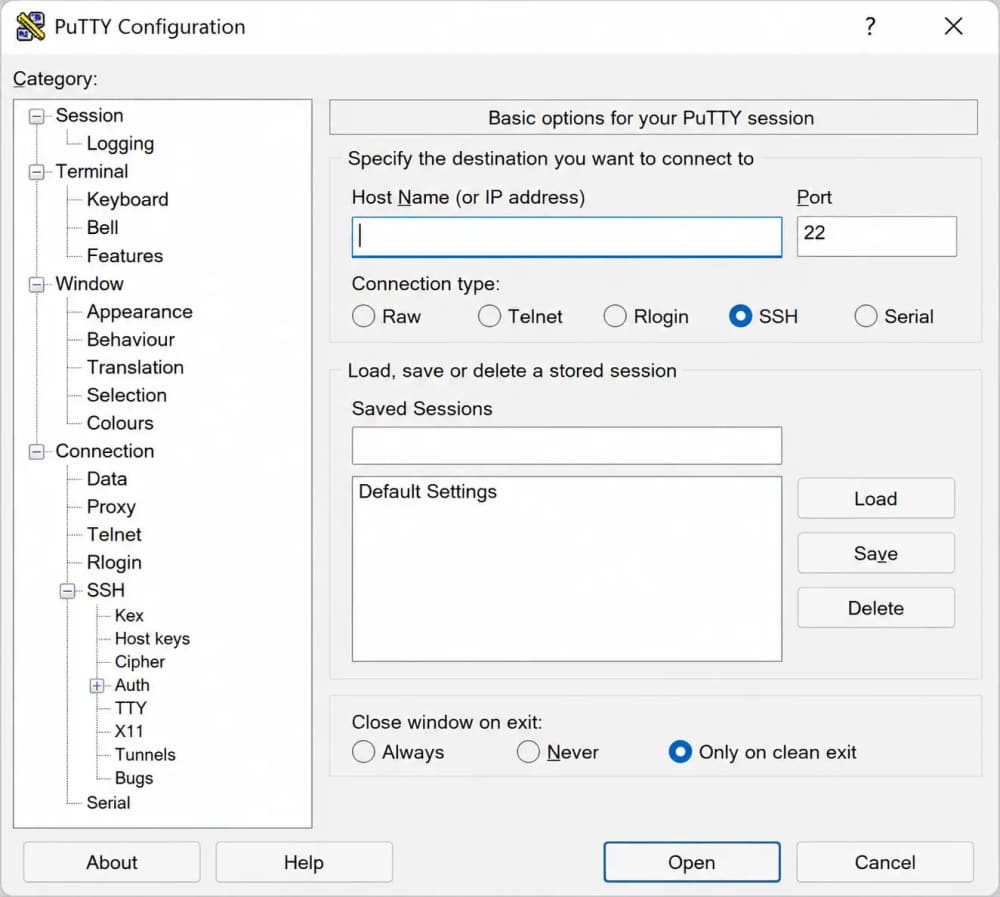
At some point, every networking student needs to connect to a router, switch, firewall, server, or lab device through a terminal.
That is where tools like PuTTY become useful, especially for Windows users. PuTTY is widely known as a free SSH and Telnet client. In modern networks, SSH is preferred because it is encrypted, while Telnet is generally avoided on real networks because it sends information in plain text.
For a student, an SSH client teaches more than typing commands. It teaches patience, accuracy, and confidence. A single typo can break a configuration. A well-documented command can fix a whole network.
Use SSH clients to practice:
- Logging into lab devices securely
- Saving router and switch configurations
- Checking interface status
- Managing Linux servers
- Building confidence with command-line environments
If you are using Windows 11, you may also explore Windows Terminal and the built-in OpenSSH client. Still, PuTTY remains a familiar tool in many learning environments.
6. Nmap: Network Discovery With Permission
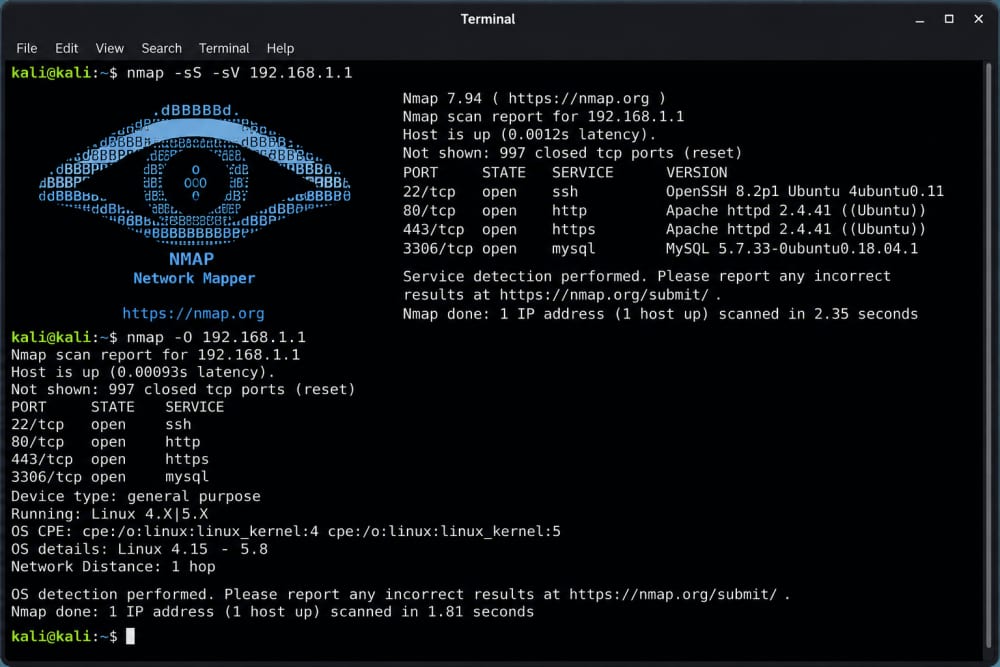
Nmap is a respected open-source tool used for network discovery, administration, and security auditing. It helps identify hosts and services on a network when used responsibly.
For ICT students, Nmap can teach an important lesson: every device on a network has a visible footprint. A printer, router, server, laptop, CCTV recorder, access point, or web server may expose services that need to be managed carefully.
However, this is one tool where ethics must be very clear. Use Nmap only on your own lab, your own devices, or systems where you have written permission. Scanning networks you do not own can be disruptive, suspicious, and against policy or law.
In a safe lab, Nmap can help you understand:
- Which devices are active
- Which services are exposed
- Why unused services should be disabled
- How network visibility affects security
- Why documentation matters
Think of Nmap as a responsibility tool, not a show-off tool.
7. Subnet Calculators: Stop Fearing IP Addressing
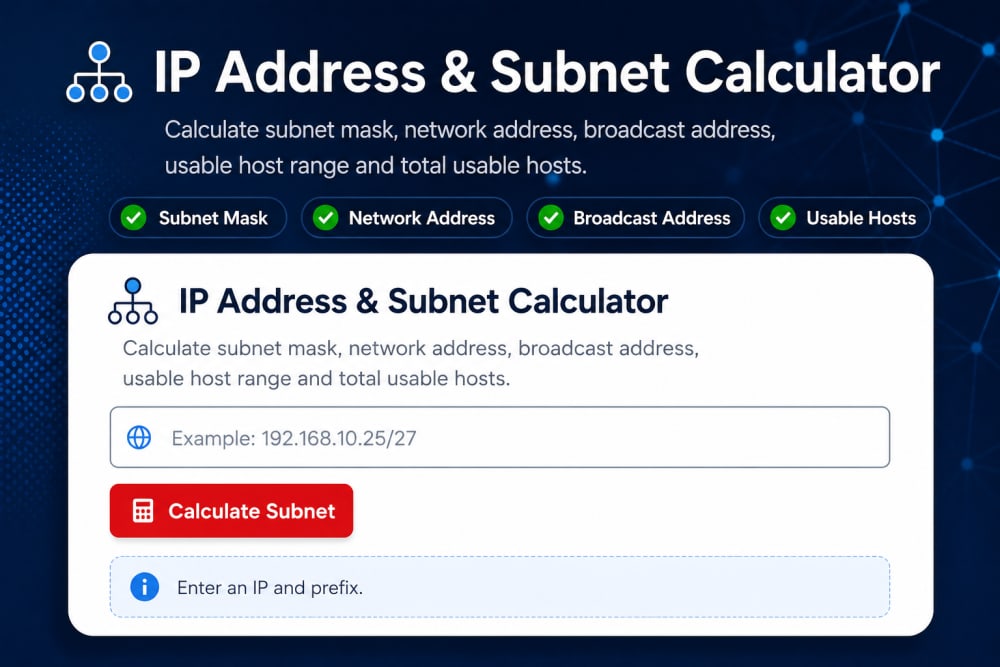
Subnetting is one of those topics that can scare ICT students at first.
The good news is that subnet calculators can help you check your work as you learn. They show network addresses, usable host ranges, broadcast addresses, subnet masks, and CIDR notation.
But here is the trick: do not use subnet calculators as a shortcut forever. Use them as a teacher. First, calculate manually, then confirm with the tool. Over time, your confidence improves.
A subnet calculator is helpful when planning:
- Small office networks
- VLAN address ranges
- Point-to-point links
- IP allocation for labs
- Address planning for future expansion
The best ICT students do not just ask, “What is the answer?” They ask, “Why is this the answer?”
8. Documentation Tools: Think Like a Professional
Many beginners ignore documentation because it does not feel as exciting as configuring routers or capturing packets.
But in real ICT work, poor documentation creates real problems. If nobody knows which port connects to which office, which VLAN serves which department, or which IP address belongs to which device, troubleshooting becomes slow and frustrating.
You do not need complicated software at the beginning. A spreadsheet, a clean diagram, and a well-organized folder can already make you look professional.
Document these details in your labs and real projects:
- Device names and roles
- IP addresses and subnets
- Switch port assignments
- VLAN numbers and names
- Router interfaces
- Wi-Fi SSIDs and security settings
- Change history
A student who documents well is easier to trust during internships, attachments, and entry-level ICT roles.
A Simple Learning Path for ICT Students
If you are wondering where to begin, do not try to master every tool in one week.
Start with the tools that answer the most basic questions first, then grow into deeper analysis.
- Start with Packet Tracer to build safe virtual networks.
- Use ipconfig or similar tools to understand your own device settings.
- Use ping to test reachability.
- Use traceroute to understand network paths.
- Use Wireshark to observe packets in a controlled lab.
- Use PuTTY or SSH clients to manage lab devices.
- Use Nmap responsibly only in authorized environments.
- Document everything so your work can be understood later.
This learning path builds confidence gradually. It also mirrors how real troubleshooting works: observe, test, isolate, confirm, fix, and document.
Final Thoughts: Tools Turn Theory Into Skill
Networking becomes less scary when you stop guessing and start testing.
Cisco Packet Tracer gives you a safe lab. Ping and traceroute help you test communication. IP configuration tools show whether your own device is properly connected. Wireshark reveals the hidden packet conversations. PuTTY and SSH clients help you manage devices. Nmap, when used ethically, teaches visibility and security awareness. Subnet calculators strengthen your addressing skills. Documentation tools make your work professional.
The best ICT students are not the ones who know every command by memory. They are the ones who know how to approach a problem calmly, choose the right tool, test carefully, and explain the result clearly.
That is the kind of skill that stands out in class, during attachment, in interviews, and later in real ICT work.
About the author
Caleb Muga is the founder of SurgeTechKnow, an ICT professional and software developer with BBIT, CCNA training, cybersecurity awareness and OPSWAT file-security training. Articles are written to simplify practical technology, cybersecurity, networking and ICT support topics for real users.
Read the full SurgeTechKnow profile →Related Networking Articles
How Computers Communicate on the Internet: A Complete Beginner’s Guide to Packets, IP Addresses, Routers, DNS, TCP and the Journey of Your Data
50 CCNA Questions and Answers: Complete Beginner-Friendly Study Guide for CCNA 200-301-Part 2
