Free Cybersecurity Tools for Beginners: The Practical Starter Guide

You do not need an expensive lab, a powerful gaming laptop, or a paid certification to start learning cybersecurity.
Sometimes the journey starts with a simple question: “Why is my Wi-Fi slow?” Other times it starts when a friend’s Facebook account gets taken over, a browser extension behaves strangely, or a suspicious email lands in your inbox.
That is how many beginners enter cybersecurity. Not through dramatic movie scenes, but through everyday problems that make them curious.
When I first started exploring networking and cybersecurity, I quickly learned one lesson: tools are powerful, but only when you understand what problem you are trying to solve. A beginner can install ten tools in one afternoon and still feel lost if nobody explains where each one fits.
This guide is written for beginners, ICT students, small business owners, junior technicians, and curious users who want to learn cybersecurity using free, legal, and practical tools. The goal is simple: by the end, you should know which free tools to start with, what each one does, and how to use them responsibly on systems you own or have permission to test.
Quick Navigation
- ➜ Why Free Cybersecurity Tools Matter
- ➜ The Beginner Rule: Test Only What You Own
- ➜ Wireshark: See What Is Happening on a Network
- ➜ Nmap: Discover Devices and Open Services
- ➜ OWASP ZAP: Learn Web Application Security
- ➜ VirusTotal and Have I Been Pwned: Quick Safety Checks
- ➜ Bitwarden and 2FA Tools: Protect Your Accounts
- ➜ CyberChef: Decode and Understand Data Safely
- ➜ Security Onion: A Beginner-Friendly Security Lab
- ➜ A Simple 30-Day Learning Path
- ➜ Final Thoughts
- ➜ References
Why Free Cybersecurity Tools Matter
Cybersecurity can look expensive from the outside. You hear about enterprise firewalls, SIEM platforms, endpoint detection systems, and paid penetration testing suites.
But the foundation is not expensive. Many of the best learning tools are free, open-source, and trusted by students, professionals, companies, and security communities around the world.
The real value is not just the tool itself. The value is learning how to observe, ask better questions, document findings, and make safer decisions.
For a beginner, free tools help you learn skills like:
- Checking what devices exist on your own network
- Understanding open ports and exposed services
- Inspecting network traffic for troubleshooting
- Testing a personal website for common security weaknesses
- Checking whether an email, file, or link looks suspicious
- Improving password and account security
This is why I always encourage beginners to start small. Do not rush to “hack everything.” Learn how systems work first.
The Beginner Rule: Test Only What You Own
Before we talk about tools, we need to talk about permission.
Cybersecurity tools are not toys. Even free tools can cause trouble if you run them against networks, websites, or devices that do not belong to you.
A safe beginner rule is this: only test your own devices, your own home lab, your own website, or a training platform that clearly allows testing. If you work in an office, school, cyber café, or government environment, ask for written permission before scanning or testing anything.
Important safety note: This article is for learning, defensive awareness, and authorized testing. Do not scan, attack, intercept, or test systems without permission.
1. Wireshark: See What Is Happening on a Network

Wireshark is one of the best tools for beginners who want to understand networking deeply. It lets you capture and inspect network packets, which are the small pieces of data moving through a network.
At first, Wireshark can look intimidating. You open it and suddenly see many lines moving quickly across the screen.
But once you slow down, it becomes a classroom. You can observe DNS requests, TCP handshakes, HTTP traffic, device communication, and connection problems.
A beginner can use Wireshark to learn:
- How a device asks DNS to translate a domain name
- Why do some websites load slowly
- What happens when a device connects to a router
- The difference between encrypted and unencrypted traffic
For example, if your home internet feels slow, Wireshark can help you observe whether your computer is making repeated DNS requests or whether a service keeps retrying a connection.
Start with simple captures on your own device. Do not capture other people’s private traffic without permission.
2. Nmap: Discover Devices and Open Services
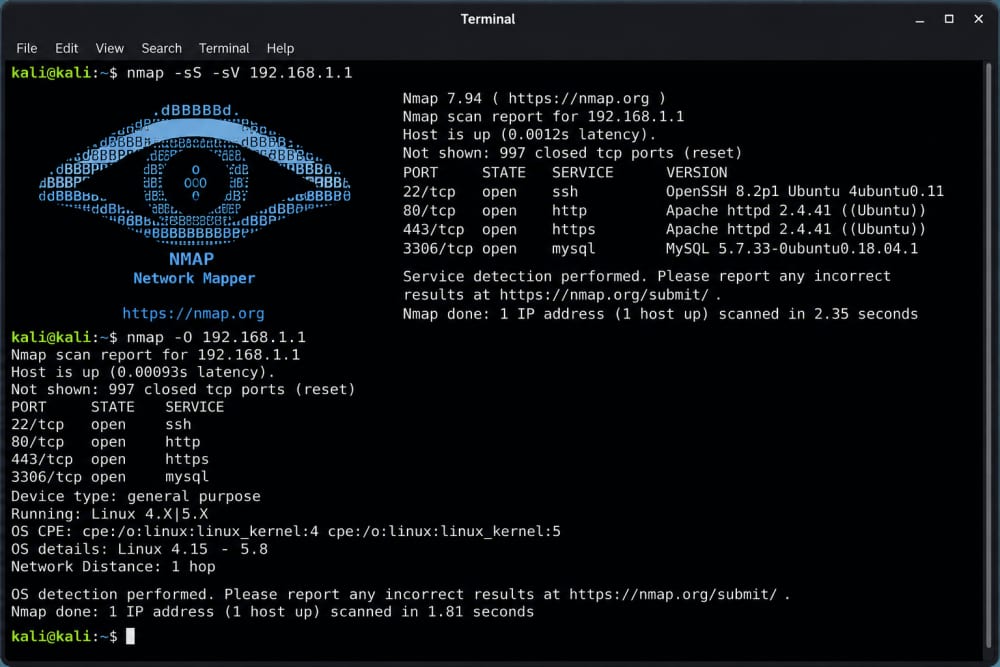
In beginner language, Nmap helps you answer questions like: “What devices are on my network?” and “Which services are exposed?”
This is useful because many security problems begin with exposure. A router admin page, remote login service, old printer interface, or unused service can quietly remain open for months.
A beginner can use Nmap to learn:
- Basic network inventory
- The meaning of open, closed, and filtered ports
- Why unnecessary services should be disabled
- How firewalls affect visibility
The best beginner exercise is to scan your own home lab or a practice virtual machine. Document what you find, then ask yourself whether every open service is truly needed.
That habit alone builds a strong security mindset.
You May Also Like To Read About
3. OWASP ZAP: Learn Web Application Security

If you run a blog, portfolio, school project, Flask app, WordPress site, or small business website, OWASP ZAP is a tool worth learning.
ZAP is a free, open-source web application security testing tool. It helps you inspect how a website behaves and identify common security issues during authorized testing.
For beginners, ZAP teaches important ideas such as:
- How web requests and responses work
- Why input validation matters
- How missing security headers can weaken a site
- Why authentication and session handling must be protected
The safe way to start is by testing your own local development website or a deliberately vulnerable training application. Do not point it at someone else’s live website just because the tool is free.
If you are a beginner developer, ZAP is especially valuable because it connects coding with security. You begin to see how small coding decisions affect real-world risk.
4. VirusTotal and Have I Been Pwned: Quick Safety Checks
Not every cybersecurity tool needs to be complex. Some of the most useful beginner tools are simple checking services.
VirusTotal allows users to check suspicious files, URLs, domains, and hashes using multiple security engines. It is helpful when you receive a strange link, download a file, or want a second opinion before opening something risky.
However, beginners should remember one important point: do not upload private documents, confidential files, or personal data to public scanning services. If a file contains sensitive information, treat it carefully.
Have I Been Pwned is another beginner-friendly service. It helps you check whether an email address appears in known data breaches.
This is useful because many account takeovers happen when people reuse old passwords from breached websites. If your email appears in a breach, change reused passwords immediately and enable two-factor authentication.
5. Bitwarden and 2FA Tools: Protect Your Accounts First
Many beginners rush to advanced tools while their own accounts remain weak. That is like buying a strong padlock for the gate while leaving the front door open.
A password manager such as Bitwarden helps you create and store unique passwords for different accounts. This matters because one leaked password should not unlock your email, banking app, social media, and website admin panel at the same time.
Pair that with two-factor authentication. Apps such as Google Authenticator, Microsoft Authenticator, Aegis, or built-in passkey options can add another layer of protection.
For a beginner, account security is the first practical cybersecurity project. Start with your email account, because email is often the recovery key for everything else.
6. CyberChef: Decode and Understand Data Safely
CyberChef is sometimes called a “cyber Swiss Army knife.” It helps you transform, decode, encode, and analyze data in a browser-based workspace.
Beginners can use it to understand things like Base64 text, URL encoding, hashes, timestamps, and simple data formats.
This is helpful when analyzing suspicious messages, logs, or web data. Instead of guessing what a strange string means, you can safely decode it and learn what format it uses.
The best part is that CyberChef encourages curiosity. You can drag operations, see results instantly, and learn by experimenting with harmless sample data.
7. Security Onion: Build a Beginner Security Monitoring Lab
Security Onion is more advanced than the earlier tools, but it is worth mentioning because it helps beginners understand how defensive security works.
It is a free and open platform used for network security monitoring, log management, and threat hunting in lab or organizational environments.
A beginner does not need to master everything at once. Start by learning the idea behind it: security teams collect logs, monitor alerts, investigate suspicious activity, and improve defenses based on evidence.
If you have a spare machine or virtual lab, Security Onion can introduce you to blue-team thinking. That means defending, monitoring, detecting, and responding instead of only focusing on offensive testing.
8. CISA Free Cybersecurity Services and Tool Lists
CISA maintains no-cost cybersecurity resources and services designed to help organizations strengthen their security posture. Even if you are outside the United States, their public guidance is useful for learning what serious cybersecurity hygiene looks like.
For beginners, CISA resources are helpful because they shift your mind from “which tool is cool?” to “which risk am I reducing?”
That is the professional way to think. A tool should help you reduce a real risk, not just make you feel technical.
A Simple 30-Day Learning Path for Beginners
Here is a practical way to start without overwhelming yourself.
- Days 1–5: Secure your own email, passwords, browser, and phone. Use a password manager and enable two-factor authentication.
- Days 6–10: Learn basic networking: IP addresses, ports, DNS, routers, and firewalls.
- Days 11–15: Use Wireshark on your own device to observe simple DNS and web traffic patterns.
- Days 16–20: Use Nmap only in your own lab to understand device discovery and open services.
- Days 21–25: Use OWASP ZAP against your own local test website or a legal training lab.
- Days 26–30: Write a short report explaining what you learned, what risks you found, and what you fixed.
That last step matters. Cybersecurity is not only about clicking tools. It is about communicating risk clearly.
Common Beginner Mistakes to Avoid
The first mistake is installing too many tools at once. You do not need everything on day one.
The second mistake is copying commands without understanding them. That approach may produce results, but it does not build skill.
The third mistake is ignoring documentation. Official documentation often explains the safest and most accurate way to use a tool.
The fourth mistake is testing without permission. That can create legal, disciplinary, or ethical problems even when you intend to learn.
Finally, do not confuse tool usage with cybersecurity maturity. A real professional learns fundamentals, keeps notes, verifies findings, and respects privacy.
Final Thoughts: Start Small, Stay Ethical, Keep Learning
Free cybersecurity tools can open a serious learning path for beginners. Wireshark teaches visibility. Nmap teaches exposure. OWASP ZAP teaches web security. VirusTotal and Have I Been Pwned teach quick safety checks. Bitwarden and 2FA tools teach personal defense. CyberChef teaches data understanding. Security Onion introduces monitoring and detection.
But the most important tool is still your mindset.
Be curious, but not careless. Be practical, but not reckless. Learn on systems you own, document what you observe, and focus on making people safer.
Cybersecurity is not only for experts in large companies. It is also for students, parents, small businesses, developers, ICT officers, and everyday internet users who want to understand risk before it becomes damage.
Start with one tool. Learn it properly. Then move to the next.
References
- CISA – No-Cost Cybersecurity Services and Tools
- Wireshark – Official Website
- Wireshark User’s Guide – Introduction
- Nmap – Free Security Scanner
- Nmap Network Scanning – Official Guide
- OWASP ZAP / Zed Attack Proxy – Official Website
- ZAP Getting Started Guide
- OWASP Web Security Testing Guide
- VirusTotal – File, URL, Domain, and Hash Analysis
- Have I Been Pwned – Breach Checking Service
- Bitwarden – Password Manager
- CyberChef – GCHQ
- Security Onion – Open Platform for Defenders
About the author
Caleb Muga is the founder of SurgeTechKnow, an ICT professional and software developer with BBIT, CCNA training, cybersecurity awareness and OPSWAT file-security training. Articles are written to simplify practical technology, cybersecurity, networking and ICT support topics for real users.
Read the full SurgeTechKnow profile →

