Can Someone Hack You Through WhatsApp? The Truth Behind Common WhatsApp Scams

Quick Navigation
One of the most common cybersecurity questions I hear from friends, colleagues, and everyday smartphone users is:
"Can someone hack me through WhatsApp?"
The short answer is:
Yes, but probably not in the way you think.
Many people imagine a hacker simply typing their phone number into a computer and instantly gaining access to their WhatsApp messages.
In reality, successful WhatsApp compromises usually happen because attackers trick users into helping them. Instead of breaking into the application itself, cybercriminals often rely on social engineering, fake verification codes, malicious links, account takeover scams, and device compromise.
As someone who frequently interacts with technology users and follows cybersecurity trends closely, I have noticed that most victims never realize they are being targeted until after their accounts have already been compromised.
The good news is that understanding how these attacks work makes them much easier to avoid.
Let's explore the real ways attackers target WhatsApp users, the warning signs to watch for, and how you can keep your account secure.
Why WhatsApp Is a Valuable Target
WhatsApp is one of the most widely used messaging platforms in the world.
People use it for:
-
Personal conversations
-
Business communication
-
Family groups
-
School discussions
-
Financial transactions
-
Customer support
For attackers, a compromised WhatsApp account provides access to something extremely valuable:
Trust.
When a message appears to come from a friend, family member, colleague, or employer, people are more likely to believe it.
This makes WhatsApp accounts attractive targets for cybercriminals.
Can Someone Hack WhatsApp Just By Knowing Your Number?
This is probably the biggest misconception.
Simply knowing your phone number does not automatically give someone access to your WhatsApp account.
If that were possible, millions of accounts would be compromised daily.
However, attackers can use your phone number as a starting point for scams.
For example, they may:
-
Send phishing messages
-
Attempt verification-code scams
-
Impersonate contacts
-
Conduct social engineering attacks
The phone number alone is usually not enough.
The attack succeeds when users unknowingly provide additional information.
The Verification Code Scam
One of the most common WhatsApp attacks involves verification codes.
Here's how it usually works.
Step 1: The Attacker Requests Your WhatsApp Verification
The attacker enters your phone number into WhatsApp's registration system.
WhatsApp then sends a verification code to your phone.
Step 2: The Attacker Contacts You
The scammer may claim:
-
They accidentally sent a code to your number
-
They are a friend needing help
-
They are from customer support
-
They are verifying an account
They then ask you to forward the code.
Step 3: The Victim Shares the Code
Once the attacker receives that code, they can register your WhatsApp account on another device.
At that point, they may gain control of the account.
My Observation
I have seen many users assume that a verification code is harmless because it appears to be "just a number."
In reality, that code is often the final key needed to access the account.
If someone asks for your WhatsApp verification code, the safest response is simple:
Never share it.
WhatsApp Phishing Attacks
Cybercriminals increasingly use phishing attacks on WhatsApp.
You may receive a message saying:
-
Your account will be suspended
-
You've won a prize
-
Your bank account needs verification
-
A package delivery requires confirmation
The message usually contains a link.
The goal is to redirect victims to a fake website.
Once there, users may unknowingly enter:
-
Passwords
-
Banking details
-
Personal information
-
Verification codes
The attacker then uses this information for fraud.
If you receive any suspicious link or message, don't be in a rush to open it; you can subject the link or the message to a phishing detector tool.
Can WhatsApp Links Install Malware?
In some cases, yes.
Most links themselves are not dangerous.
The danger comes when users:
-
Download unknown files
-
Install suspicious applications
-
Enable unknown permissions
A malicious application downloaded through a WhatsApp message can potentially:
-
Steal information
-
Monitor activity
-
Capture credentials
-
Display fake login screens
This is why downloading files from unknown senders is risky.
The Rise of WhatsApp Impersonation Scams
One scam that has become increasingly common involves account impersonation.
A criminal may create a profile using:
-
Your name
-
Your photograph
-
Your public information
They then contact your friends and family pretending to be you.
Typical requests include:
-
Emergency loans
-
Financial assistance
-
Mobile money transfers
-
Banking requests
Because the profile looks familiar, some victims trust the message.
Always verify unusual requests through a phone call or voice note before sending money.
Can Someone Read Your WhatsApp Messages?
WhatsApp uses end-to-end encryption.
According to WhatsApp, only the sender and the intended recipient can read the contents of encrypted messages.
This means attackers generally cannot intercept messages directly while they are being transmitted.
However, they may still gain access if:
-
They compromise your device
-
They gain control of your account
-
They install spyware
-
They access linked devices
This is an important distinction.
In many cases, attackers target the user rather than the encryption itself.
You May Also Like to Read About
WhatsApp Web and Linked Device Risks
WhatsApp Web is extremely convenient.
Unfortunately, it can also create security issues if used carelessly.
Imagine this scenario:
You log into WhatsApp Web on a shared computer.
You forgot to log out.
The next person using that computer may potentially view future conversations.
Always review your linked devices.
Check Linked Devices
-
Open WhatsApp
-
Go to Settings
-
Select Linked Devices
-
Review active sessions
-
Remove unfamiliar devices
This simple habit can prevent account misuse.
The Threat of Spyware
One of the more serious threats involves spyware.
Spyware is malicious software designed to secretly monitor activity.
Depending on its capabilities, spyware may attempt to:
-
Capture screenshots
-
Monitor keystrokes
-
Record audio
-
Access files
-
Observe messages
Fortunately, these attacks are generally targeted and far less common than social engineering scams.
For most users, phishing and account takeover attacks remain the biggest threat.
Warning Signs That Something Is Wrong
Watch for:
-
Unexpected verification codes
-
Login alerts you did not initiate
-
Unknown linked devices
-
Messages you never sent
-
Contacts reporting strange messages from your account
-
Security notifications from WhatsApp
Any of these could indicate unauthorized activity.
How to Secure Your WhatsApp Account
Enable Two-Step Verification
This is one of the most effective protections available.
Two-step verification adds a PIN requirement during account registration.
Even if someone obtains your verification code, they still need the PIN.
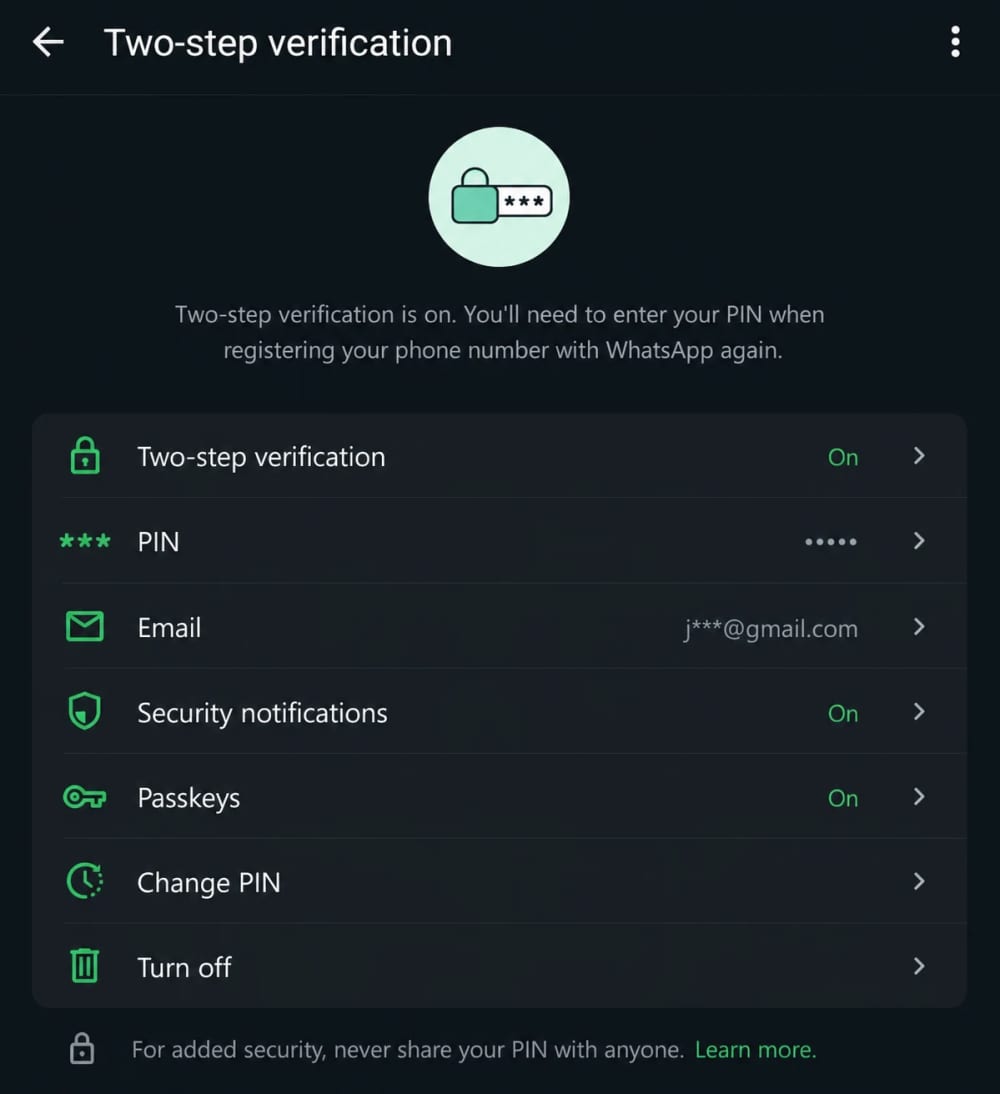
To Enable It
-
Open WhatsApp
-
Go to Settings
-
Select Account
-
Choose Two-Step Verification
-
Set a secure PIN
Never Share Verification Codes
No legitimate service representative will ask for your verification code.
Treat it like your banking PIN.
Be Careful With Links
Before clicking:
-
Verify the sender
-
Inspect the URL
-
Be cautious of urgency
Attackers often rely on panic and curiosity.
Keep Your Phone Updated
Software updates frequently include important security improvements.
Install updates promptly.
Review Linked Devices Regularly
This should become part of your security routine.
Checking takes less than a minute.
What To Do If Your WhatsApp Is Compromised
If you suspect your account has been taken over:
-
Attempt to re-register your phone number immediately.
-
Enable two-step verification.
-
Notify important contacts.
-
Remove unauthorized linked devices.
-
Contact WhatsApp support if necessary.
Acting quickly can often limit the damage.
Frequently Asked Questions
Can someone hack my WhatsApp by sending a message?
Simply receiving a message does not usually compromise your account.
The risk typically comes from interacting with malicious content.
Can someone access my WhatsApp through my phone number alone?
No. Additional information or user interaction is usually required.
Is WhatsApp safe?
WhatsApp remains one of the most secure messaging platforms available, particularly because of its end-to-end encryption.
However, user behavior still plays a major role in overall security.
Should I enable two-step verification?
Absolutely.
It is one of the most effective protections available for WhatsApp accounts.
Final Thoughts
So, can someone hack you through WhatsApp?
Yes.
But in most cases, they are not "hacking" WhatsApp itself.
Instead, they are exploiting human trust.
The majority of successful WhatsApp compromises involve social engineering, verification-code scams, phishing attacks, malicious downloads, or account impersonation.
The platform's security is strong, but no technology can fully protect users who unknowingly hand over access.
In my experience, the safest WhatsApp users are not necessarily the most technical. They are simply the most cautious. They verify unexpected requests, avoid suspicious links, review their security settings, and think before they act.
Cybercriminals succeed when people react quickly without questioning what they see.
A few seconds of caution can prevent weeks of frustration.
About the author
Caleb Muga is the founder of SurgeTechKnow, an ICT professional and software developer with BBIT, CCNA training, cybersecurity awareness and OPSWAT file-security training. Articles are written to simplify practical technology, cybersecurity, networking and ICT support topics for real users.
Read the full SurgeTechKnow profile →