Reading Deleted Messages: How to See Unsent WhatsApp Messages on Android

Ever seen the dreaded message: "This message was deleted" and immediately wondered what was written?
You are not alone.
Almost everyone who uses WhatsApp, SMS, Telegram, or other messaging apps has experienced that moment of curiosity. Someone sends a message, deletes it seconds later, and suddenly your mind starts racing. Was it important? Was it meant for you? Was it a mistake?
What many Android users don't realize is that their phone may already have a built-in feature capable of showing deleted notifications, including messages that were removed before they could be opened.
In this guide, we'll explore Notification History, how it works, its limitations, privacy considerations, and how you can activate it today.
Quick Navigation
What Is Notification History?
Notification History is a built-in Android feature introduced in newer Android versions that keeps a record of notifications received on your phone.
Think of it as a digital notebook that quietly records notifications before you dismiss them.
If a WhatsApp message appears in your notification bar and the sender later deletes it, Notification History may still retain the original notification text.
That means you can often see what was written even after the sender has unsent it.
Why People Want To Read Deleted Messages

Let's be honest.
The phrase "This message was deleted" creates curiosity almost instantly.
I remember receiving a WhatsApp notification from a colleague late one evening. Before I opened it, the message disappeared and was replaced with the deletion notice.
For several hours, I wondered whether it was work-related, a mistake, or something important.
Later, while exploring Android settings, I discovered Notification History had actually preserved part of the message.
That experience taught me that many Android phones already have tools users rarely know exist.
People commonly use Notification History to:
- Recover accidentally dismissed notifications
- Read deleted WhatsApp messages
- Review missed SMS alerts
- Track banking notifications
- Check the app alerts that disappeared
- Recover information from dismissed notifications
You May Also Like To Read About
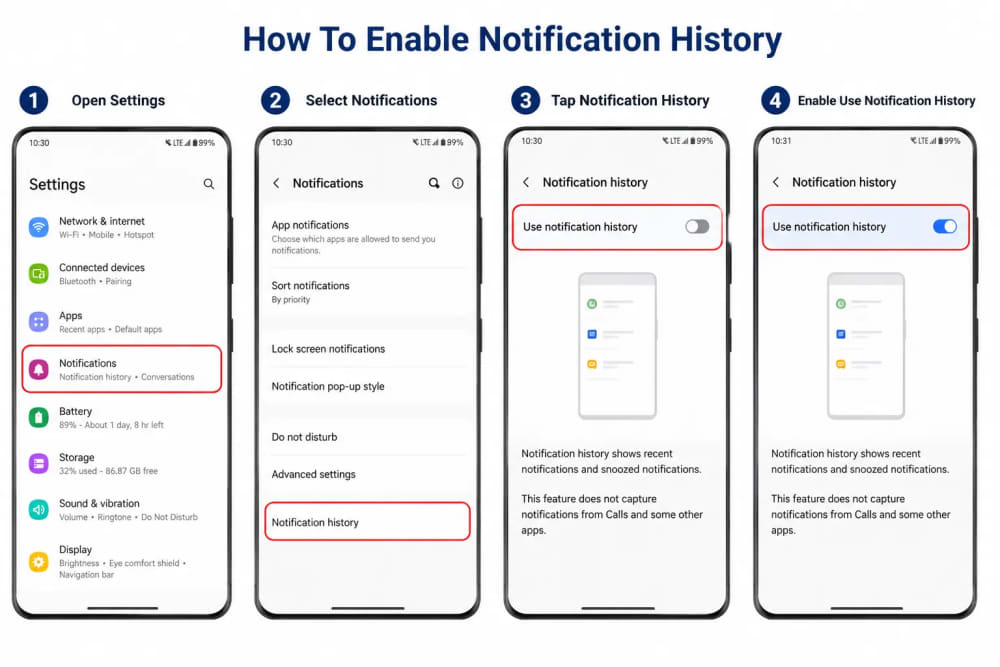
How To Enable Notification History
The process may vary slightly depending on your Android version and manufacturer.
For most modern Android devices:
- Open Settings
- Select Notifications
- Tap Notification History
- Enable Use Notification History
Once activated, Android begins storing notification records going forward.
It is important to understand that it cannot recover notifications from before the feature was enabled.
Think of it as turning on a security camera. It only records after activation.
How Does It Actually Work?
When a messaging application generates a notification, Android receives that notification before you interact with it.
Notification History stores this information inside the operating system.
If a sender later deletes the message, the original notification may still exist in the notification log.
This works particularly well when:
- The message generated a notification
- Your phone received the notification successfully
- The notification was not blocked
- Notification History was already enabled
For WhatsApp, the feature often records message previews exactly as they appeared in the notification shade.
Important Limitations You Should Know
Although Notification History is useful, it is not magic.
Many websites exaggerate their capabilities.
Here are some limitations.
1. It Cannot Recover Everything
If the message never created a notification, there may be nothing to recover.
2. Media Files Are Usually Missing
Photos, videos, voice notes, and documents often cannot be fully recovered through Notification History.
3. Older Android Versions May Not Support It
Some older devices lack the built-in feature.
4. Long Messages May Be Truncated
Only part of lengthy messages may appear in the notification preview.
5. It Must Be Enabled First
The feature generally cannot recover deleted messages from before activation.
Privacy And Security Considerations
Before enabling Notification History, it is worth understanding the privacy implications.
Since notifications can contain personal information, anyone with access to your unlocked phone may potentially view notification records.
This could include:
- Message previews
- Banking alerts
- Email notifications
- Authentication codes
- Social media messages
For this reason, always secure your device using:
- Strong PINs
- Biometric authentication
- Screen lock protection
- Updated Android security patches
Alternative Methods People Use
Many third-party applications claim they can recover deleted messages.
Examples include notification log applications and notification recovery tools.
However, caution is essential.
These applications often require extensive permissions, including access to your notifications.
Before installing any such app:
- Read user reviews carefully
- Check the developer's reputation
- Review requested permissions
- Avoid apps from unknown publishers
- Download only from trusted app stores
Remember that granting notification access means allowing another application to read sensitive alerts arriving on your device.
That creates both privacy and security risks.
Who Benefits Most From Notification History?
This feature is particularly useful for:
- Students receiving academic updates
- Professionals handling important communications
- Parents monitoring family messages
- Business owners tracking customer inquiries
- Anyone who frequently dismisses notifications accidentally
It is one of those Android features that quietly solves a surprisingly common problem.
My Final Thoughts
The next time someone sends a message and quickly deletes it, you may not need to wonder what was written.
Android's Notification History provides a simple, built-in method for reviewing many deleted message notifications without installing questionable third-party applications.
While it does have limitations, it remains one of the most useful hidden Android features available today.
More importantly, it highlights an important lesson: many smartphones already contain powerful tools that users never discover because they remain buried inside settings menus.
If you use Android regularly, enabling Notification History is a small change that could save you from missing important information in the future.
About the author
Caleb Muga is the founder of SurgeTechKnow, an ICT professional and software developer with BBIT, CCNA training, cybersecurity awareness and OPSWAT file-security training. Articles are written to simplify practical technology, cybersecurity, networking and ICT support topics for real users.
Read the full SurgeTechKnow profile →

